Home News Hotwire Cars in 'Project Zomboid': Essential Survival Guide

Hotwire Cars in 'Project Zomboid': Essential Survival Guide

Author : Thomas Jan 11,2025

In the sprawling world of Project Zomboid, traversing the map on foot is a daunting task. Luckily, many vehicles remain functional, and if keys are elusive, hotwiring offers a solution. This guide details how to hotwire cars in Project Zomboid, a surprisingly simple process once you meet the prerequisites.

Hotwiring: A Simple Process
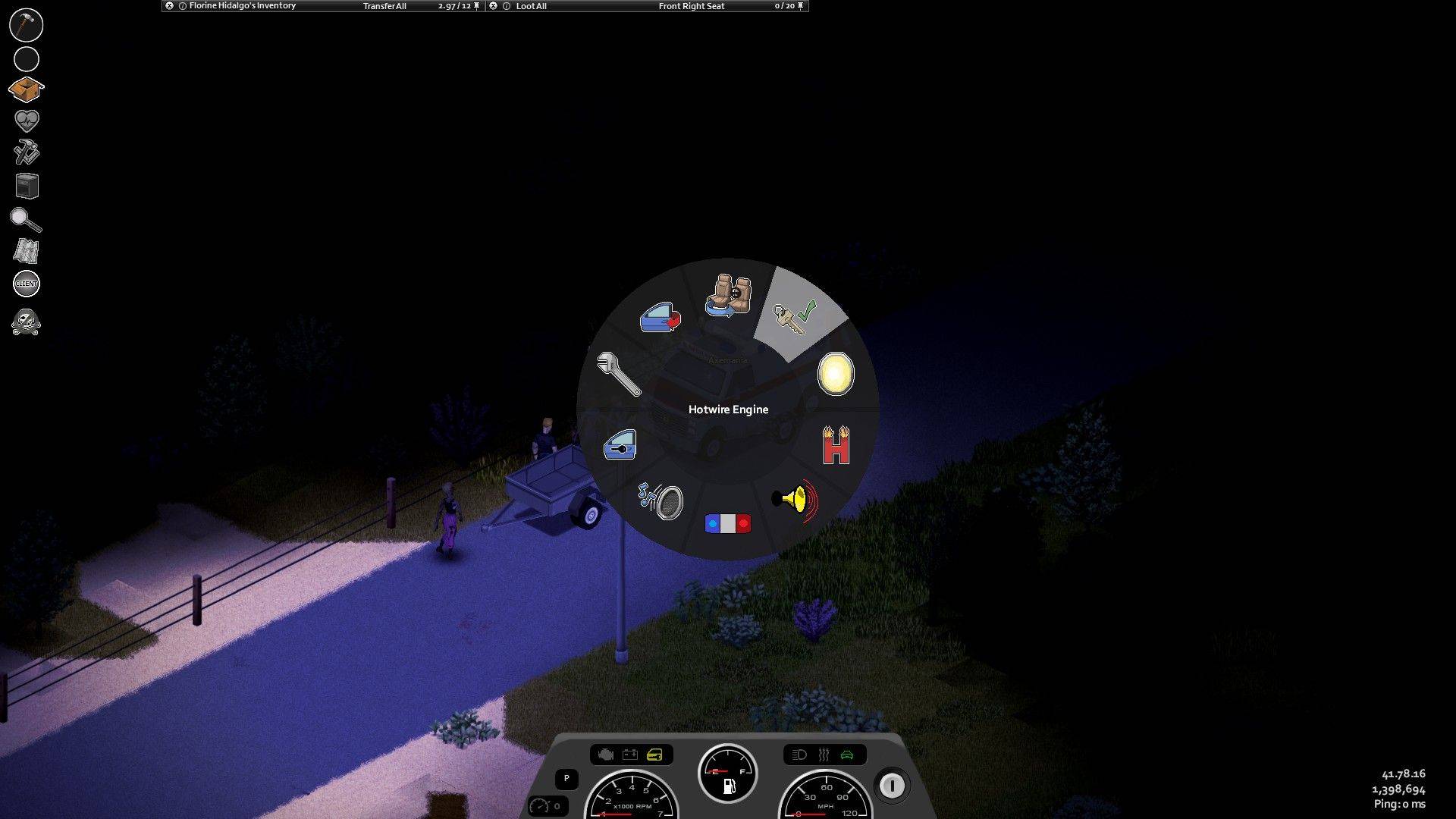
Successfully hotwiring a vehicle allows you to drive it as long as fuel and condition permit, bypassing the need for keys. However, you'll need at least Level 1 Electrical and Level 2 Mechanics skills. Alternatively, choosing the Burglar profession during character creation eliminates this skill requirement.

How to Hotwire

  1. Enter the vehicle.
  2. Access the vehicle's radial menu (default key: V).
  3. Select "Hotwire" and wait briefly.

After completing these steps, press W to start the engine. Remember that fuel levels vary, so securing gasoline is advisable.

Skill Leveling

For those not starting as a Burglar, increasing Electrical and Mechanics skills requires in-game actions:

  • Electrical: Dismantle electronics (watches, radios, TVs).
  • Mechanics: Remove and reinstall mechanical parts.

Books and magazines found in homes and businesses (mailboxes, sheds, bookshelves) also provide skill boosts. Server admins can use the "/addxp" command to directly grant skill XP to players. Remember to use a screwdriver or appropriate tool for dismantling and installation. Right-clicking vehicle parts and selecting "Vehicle Mechanics" allows for part removal.

Latest Articles More
  • Dead Cells' Final Update Launches on iOS, Android

    Dead Cells' final two updates, Clean Cut and The End is Near, have now been released.Both updates deliver the last content additions to Dead Cells, concluding years of continuous updates.New weapons, enemies, and more provide a spectacular send-off.O

    Dec 20,2025
  • Jurassic Park Tables Launch in Zen Pinball World

    Zen Studios is enhancing the Zen Pinball World collection with two new DLC packs that recreate memorable cinematic moments on the pinball table. The latest additions are Universal Classics Pinball and Jurassic Park World Pinball.Excited for the New Z

    Dec 20,2025
  • Sims 4 Blast Event: Historical Displays Guide

    Week 2 of The Sims 4's Blast from the Past event is now underway, challenging players to explore the world while solving mysteries. One seemingly simple task is causing unexpected roadblocks - here's how to successfully study a Historical Display.Whe

    Dec 20,2025
  • Clair Obscur: Expedition 33's New Developments

    Clair Obscur: Expedition 33 News2025April 3PC players will have access to extensive graphical settings, ranging from Low to Epic presets, while console players can select between Performance and Quality modes. Confirmed as a PS5 Pro Enhanced title, i

    Dec 19,2025
  • PS5 Cross-Buy Hinted for PC and PlayStation Purchases

    A "Cross-Buy" icon recently appeared on the PlayStation Store, fueling speculation that Sony may soon enable players to purchase games once and play them across both consoles and PC.Social media user Amethxst first noticed references to a "crossbuy-t

    Dec 18,2025
  • Magic Jigsaw Puzzles Launches Special Monochrome Packs for the First Time!

    ZiMAD’s Magic Jigsaw Puzzles is celebrating its 14th anniversary this month with a thoughtful and visually striking update—the launch of the Monochrome Puzzle Packs. Designed with inclusivity in mind, this special release puts accessibility at the forefront, ensuring a more enjoyable experience for

    Dec 18,2025