GTO Sensei is an advanced tool tailored for Texas Hold'em enthusiasts, focusing on implementing Game Theory Optimal (GTO) strategies to enhance players' skills. This platform offers comprehensive hand analysis and strategic guidance, helping players make informed decisions during intricate poker games. With its robust data processing capabilities and user-friendly interface, GTO Sensei is suitable for players at every level, from novices to seasoned professionals. Dive into GTO Sensei today to refine your poker skills and secure more victories!
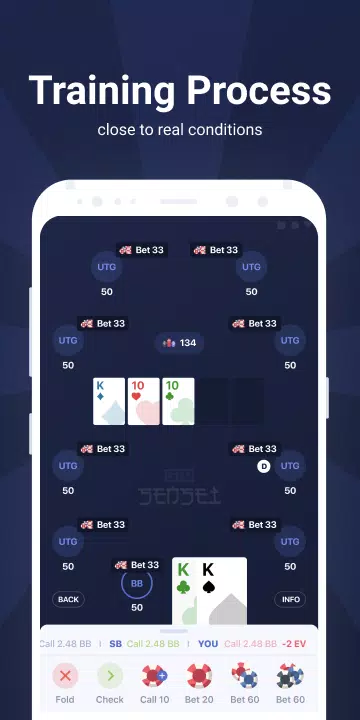
Training Process of GTO Sensei
Features of GTO Sensei
1. START TRAINING FOR FREE
GTO Sensei offers a Free Training Pack with drills tailored for various game types, including MTT, Cash, Spin&Gos, and more. You can explore the app for free to see how it can boost your game. For more in-depth training on specific game types, paid monthly subscriptions are available with a 3-day trial period.
2. CROSS PLATFORM AVAILABILITY
GTO Sensei is accessible on your iPhone, iPad, and Android devices. The app is optimized for each platform, ensuring seamless performance across different devices.
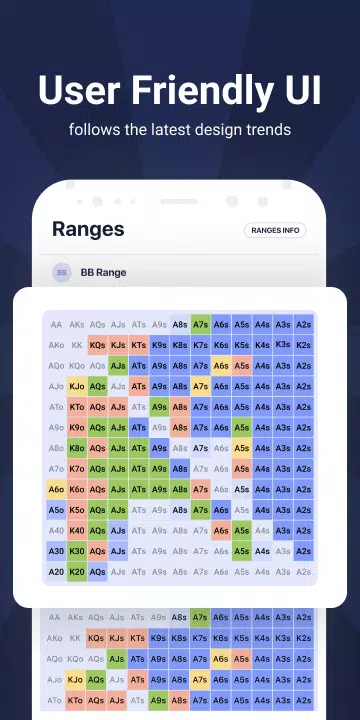
3. USER-FRIENDLY INTERFACE
Designed with the latest trends in mobile application design and user experience in mind, GTO Sensei's interface is both user-friendly and intuitive. This allows anyone to quickly grasp the app and start improving their poker skills in no time.
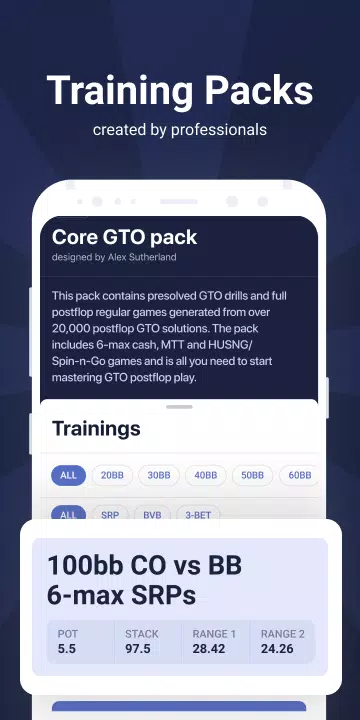
4. TRAINING PACKS FROM THE PROS
The training packs in GTO Sensei are developed by experienced players and renowned poker coaches. These packs encompass a wide array of postflop scenarios, enabling you to practice various game situations effectively.
5. CUTTING EDGE TECHNOLOGY
Utilizing a vast array of pre-calculated GTO strategies, the application employs complex game trees solved with high precision using the top GTO algorithms from the SimplePostflop solver. Preflop ranges for most packs are calculated using Simple Preflop Holdem.
How to download GTO Sensei?
1. Visit the Official Website: Navigate to GTO Sensei's official website by opening your web browser and searching for "GTO Sensei official website."
2. Create an Account: On the website, click on "Register" or "Create Account" to set up your profile. Enter your email, choose a username and password, and complete the verification process to activate your account.
3. Choose a Subscription Plan: GTO Sensei offers various subscription plans, including monthly, quarterly, and annual options. Select the plan that aligns with your needs, noting that some plans include a free trial period.
4. Download the Software: Log into your account and go to the download page. Click on the link suitable for your operating system (Windows, Mac, or Linux) to start the download.
5. Install the Software: After the download completes, run the installer by double-clicking it. Follow the installation wizard's prompts, granting necessary permissions and selecting an installation location as required.
6. Launch GTO Sensei: Once installed, find the GTO Sensei shortcut on your desktop or in the start menu. Launch the software and log in with your credentials to begin using it.
7. Import Hand Histories: To analyze your gameplay, import your hand histories into GTO Sensei. Export your hand history file from your poker client, then select "Import Hand History" in GTO Sensei to upload it.
8. Start Analysis: With your hand history imported, utilize GTO Sensei's features to analyze your hands and decisions. The software will provide detailed reports to pinpoint strategy leaks and suggest improvements.
9. Regular Updates: Keep your software up to date by regularly checking for updates within GTO Sensei's settings or about page, ensuring you benefit from the latest features and enhancements.
Tips for GTO Sensei Players
Understand the Basics of GTO: Familiarize yourself with the foundational principles of GTO, including balanced strategies, range balancing, and exploitative play, before diving into GTO Sensei.
Analyze Your Hand Histories: Regularly import your hand histories into GTO Sensei for in-depth analysis. This will help you identify weaknesses in your strategy and learn how to address them.
Utilize the Simulation Feature: Take advantage of GTO Sensei's simulation feature to experiment with different strategies and decision-making processes, helping you find the optimal approach for your gameplay.
Focus on Range Building: Mastering GTO requires understanding how to build balanced ranges. Use GTO Sensei to analyze and construct your ranges across various scenarios to keep your opponents guessing.
Learn to Interpret Reports: GTO Sensei's reports compare your play to GTO strategies. Spend time understanding these reports thoroughly to adjust your strategy effectively.
Practice and Repetition: Consistent practice is key to mastering GTO strategies. Use GTO Sensei to simulate real-game situations repeatedly to refine and adapt your approach.
Be Patient and Keep Learning: Mastering GTO is a journey that requires patience and continuous learning. Stay committed, and your skills and understanding will grow steadily.
Conclusion:
GTO Sensei stands out as an essential tool for Texas Hold'em players, leveraging Game Theory Optimal (GTO) strategies to elevate gameplay. It provides thorough hand analysis, strategic guidance, and advanced simulation features, aiding players in developing balanced ranges and enhancing their decision-making skills. With its intuitive interface and detailed reporting, GTO Sensei is perfect for players at any skill level, from beginners to experts, making it an indispensable resource for those aiming to improve their poker game through GTO principles.