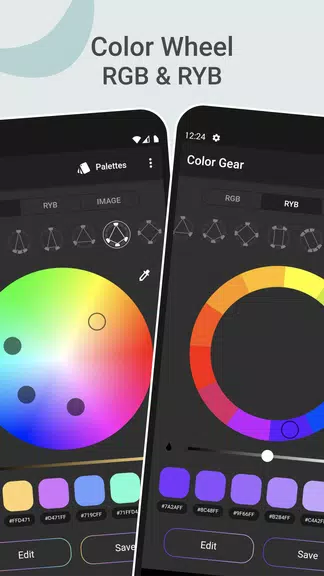
Color Gear: color wheel is the ultimate tool for artists and designers aiming to craft stunning color palettes. With support for both RGB and RYB color models, along with over 10 color harmony schemes, this app caters to both beginners and seasoned professionals. You can easily generate palettes by entering a color code or by extracting colors from photos using the innovative palette extractor feature. The advanced color editing tool allows for precise adjustments, while the ability to save and share palettes facilitates seamless collaboration. With Color Gear, creating harmonious palettes has never been more accessible. Dive in and unleash your creativity today!
Features of Color Gear: color wheel:
⭐ Use a color wheel that suits your needs
The app supports both the RGB Color Wheel and the Itten Color Wheel, enabling you to select the color model that best aligns with your project. With over 10 color schemes at your disposal, crafting harmonious palettes is a breeze.
⭐ Build a color palette based on the added color code
Simply input a color name or code (HEX or RGB), and the app will generate matching color harmonies for you to explore and select from.
⭐ Ability to extract colors from images: palette extractor
Effortlessly transform your photos into color palettes by choosing an image from your gallery. The app's algorithms will extract the colors for you, or you can manually select colors using the Color Picker tool.
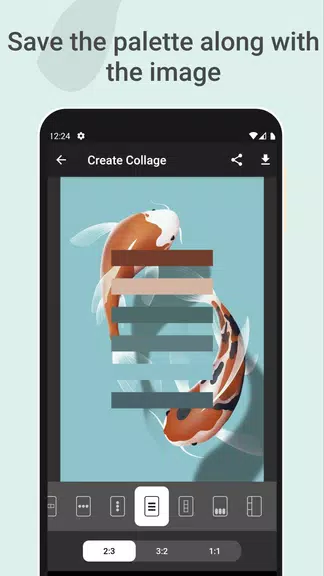
⭐ Save the Palette along with the Image
Create stunning collages by overlaying your color palette on an image, and share it on social media or save it for future reference.
⭐ Advanced color editing tool
Edit color values such as Hue, Saturation, and Lightness with precision to customize your palette to perfection.
⭐ Easy to manage and share
Effortlessly save, share, remove, and edit your palettes within the app. Copy HEX color codes to the clipboard and access multiple color formats for each palette.
Tips for Users:
⭐ Experiment with different color models and schemes
Explore various color models and schemes to uncover new and exciting color combinations for your projects. Don't hesitate to get creative and mix things up!
⭐ Use the palette extractor for inspiration
Leverage the palette extractor feature to find color inspiration in your photos. Let your creativity flow by integrating real-life colors into your designs.
⭐ Customize your color palette with the editing tool
Fine-tune your color palette by adjusting the Hue, Saturation, and Lightness values to achieve the perfect look. Don't be afraid to experiment until you find the colors that resonate with you.
Conclusion:
With its user-friendly interface, advanced features, and offline functionality, Color Gear: color wheel simplifies the process of color selection and palette creation. Whether you're a seasoned professional or a beginner eager to delve into color theory, the app provides all the tools you need to bring your creative visions to life. Download Color Gear today and unlock a world of possibilities in color design!