Mastering Headshots in Free Fire: A Comprehensive Guide
Free Fire's fast-paced action demands precision, and headshots are the key to victory. This guide explores techniques and settings to significantly improve your headshot accuracy.
Understanding Headshots
A well-placed headshot instantly eliminates opponents, providing a crucial advantage. Achieving consistent headshots requires mastering sensitivity settings, employing effective techniques, and dedicated practice.
Optimizing Sensitivity Settings
Sensitivity settings directly impact aiming speed and accuracy. Proper adjustments ensure smooth, precise crosshair movement.
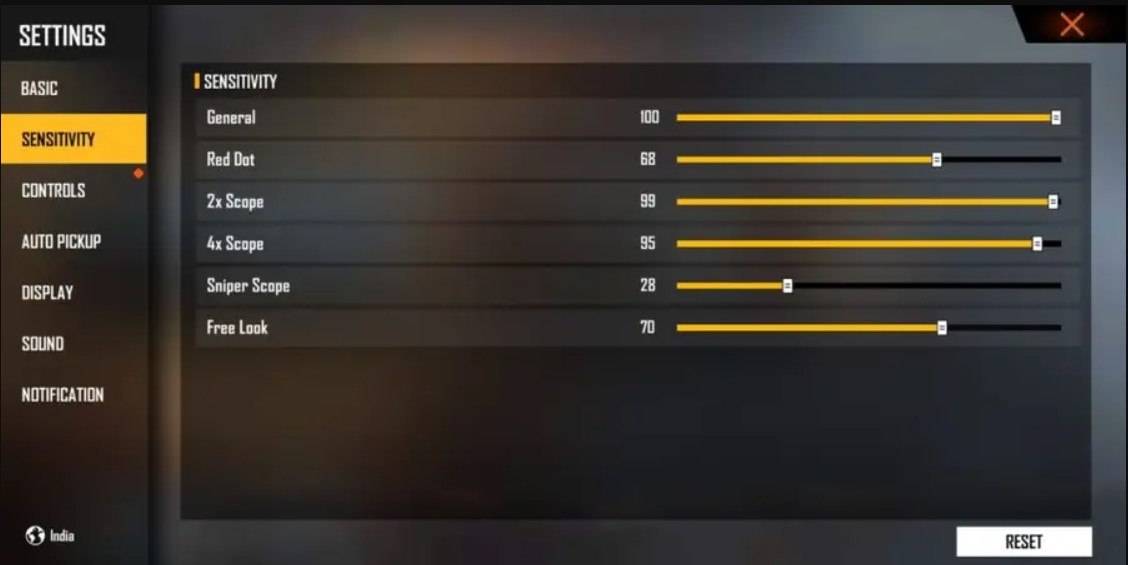
Recommended Settings:
- Aim Precision: Default
- Left Fire Button: Always
- Reload Progress on Crosshair: Off
- Hold Fire to Scope: On
- Grenade Slot: Double Slot
- Vehicle Controls: Two-handed
- Auto-parachute: On
- Quick Weapon Switch: On
- Quick Reload: Off
- Run Mode: Classic
- Free Look: On
Customizing Your HUD Layout
Your HUD layout significantly impacts control and performance. A personalized setup enhances your ability to react quickly and accurately.
- Fire Button Placement: Position for easy thumb access. Three- or four-finger claw setups are popular among pro players.
- Drag Shooting: Enable drag shooting, keeping the fire button size between 50-70% for precise swiping.
- Quick Weapon Switch: Place the weapon switch button near your thumb for rapid weapon changes.
- Crouch and Jump Buttons: Position these near movement controls for seamless execution of crouch + shoot and jump + shoot techniques.
- Scope Button: Keep the scope button easily accessible for quick aiming.
Leveraging BlueStacks for Enhanced Accuracy
BlueStacks offers a superior gaming experience, particularly for aiming. Its features significantly enhance headshot accuracy.
- Keyboard and Mouse Support: Precise aiming and control far surpassing touch controls.
- Customizable Key Mapping: Tailor controls to your preferences for optimal headshot performance. Assign the fire button to the mouse for smoother drag shots.
- Enhanced Graphics and Performance: High-quality graphics without lag, ensuring a smoother aiming experience.
- Improved Sensitivity Settings: Fine-tune sensitivity for precise drag shots and scoped headshots.
Experience Free Fire's enhanced gameplay on a larger screen with keyboard and mouse support through BlueStacks.