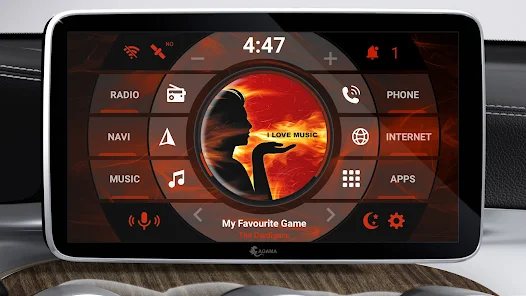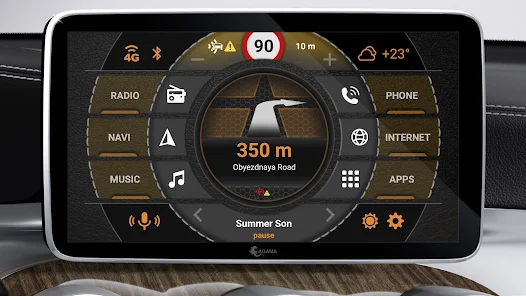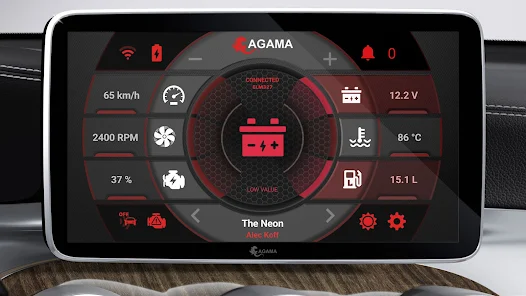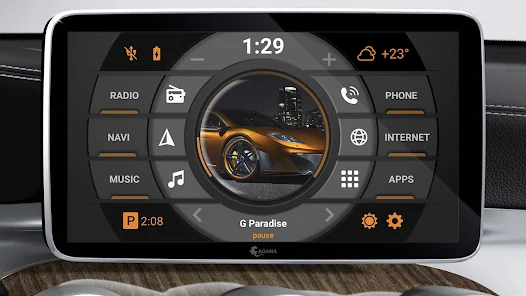
AGAMA Car Launcher is a specialized launcher designed for Android Auto, offering a user-friendly interface and customizable features. It provides quick access to apps, navigation, and media controls, enhancing the driving experience. The launcher supports voice commands and gestures, ensuring safe and convenient operation while on the road. With its sleek design and intuitive functionality, AGAMA Car Launcher is an excellent choice for drivers seeking an optimized in-car infotainment system.
Features of AGAMA Car Launcher:
> Simple and Purposeful Design: AGAMA Car Launcher offers a clean and elegant design that can be adjusted to match the style of your car, providing seamless integration into your dashboard.
> Flexible Design Settings: With AGAMA, you have the flexibility to customize the layout and appearance of the launcher to suit your preferences and mood, ensuring a personalized user experience.
> Customizable Buttons: AGAMA comes with 24 customizable buttons that allow you to quickly launch your favorite apps and functions with just a tap, making it easy to access the features you use most often.
> Speedometer Widget: The speedometer widget in AGAMA provides accurate speed information based on GPS, keeping you informed and aware of your driving speed at all times.
> Music Player and Navigator Widgets: AGAMA includes music player and navigator widgets that support popular music playback apps and route guidance, making it convenient to control your music and navigate while on the road.
> Information Display and Voice Assistant: AGAMA features an information display that shows important details such as Wi-Fi, GPS, mobile internet, Bluetooth, USB, and battery status, as well as a voice assistant for hands-free control and convenience.
Playing Tips:
> Customize Your Layout: Take advantage of AGAMA's flexible design settings to create a layout that suits your preferences and complements the interior of your car.
> Set Up Your Favorite Apps: Use the customizable buttons to quickly launch your most-used apps and functions, saving time and making it easier to access essential features on the go.
> Stay Informed on the Road: Keep an eye on the speedometer widget for accurate speed information, and use the music player and navigator widgets to control your music and navigation effortlessly while driving.
Customizable and Stylish Design
The AGAMA Car Launcher boasts a sleek and purposeful design that seamlessly adapts to the interior aesthetics of your vehicle. Tailor the appearance to match your car's style and your personal preferences for an unparalleled driving experience.
Flexible Configuration Options
Enjoy extensive design settings that cater to your individual needs. Whether you prefer a minimalist layout or a more detailed interface, AGAMA offers the flexibility to configure your dashboard just the way you like it.
Quick Access with 24 Customizable Buttons
Streamline your driving experience with 24 customizable buttons that allow you to launch your favorite apps and functions instantly. This feature ensures that you can access essential tools and services with just a single tap.
Accurate Speedometer Widget
Stay informed and in control with a real-time speedometer widget that utilizes GPS technology for precise speed measurements. This widget ensures you always know your current velocity, enhancing safety and awareness on the road.
Comprehensive Music Player Widget
Enjoy seamless music playback with a widget that supports a wide range of popular music apps. Whether you're streaming your favorite playlist or tuning into the radio, AGAMA's music player widget makes it easy to control your audio experience.
Turn-by-Turn Navigation with Navigator Widget
Get reliable route guidance with the built-in navigator widget. This feature provides turn-by-turn directions, helping you stay on course and arrive at your destination with ease.
Travel-Ready Compass Widget
Perfect for adventure enthusiasts, the compass widget offers accurate directional information. Whether you're exploring off-the-beaten-paths or navigating through unfamiliar territory, this widget keeps you oriented and on track.
Comprehensive Information Display
At-a-glance access to essential system information, including Wi-Fi status, GPS signal strength, mobile internet connectivity, Bluetooth pairing, USB activity, and battery life. This all-in-one display ensures you're always aware of your vehicle's technological status.
Local Weather Information for 5 Days
Stay ahead of the weather with local weather forecasts that are updated and stored for up to five days. This feature provides valuable insights, helping you plan your trips and avoid potential hazards.
Automatic Screen Brightness Adjustment
Ensure optimal visibility and reduce eye strain with automatic screen brightness adjustment. This feature calibrates the screen's brightness based on ambient lighting conditions, providing a comfortable viewing experience regardless of the time of day.
Voice Assistant Integration
Stay hands-free and focused on the road with voice assistant integration. Control your apps, make calls, send messages, and more using simple voice commands. This feature enhances safety and convenience, making it easier to stay connected while driving.
What's New in the Latest Version
Last updated on Nov 13, 2024
- Light interface theme
- OBD integration
- Live wallpaper: smoke effect
- Choice of analog or digital clock
- Smart maneuver icons (for Google and Yandex Maps)
- New "Universal Player"
- Track cover animation
- New theme presets
- Option to remove "Day/Night," "Settings," and "+" icons
- Font customization
- Zero altitude point setting
- Fixed USB and Bluetooth icons