Home Apps Tools Txt Spliter
Txt Spliter

Txt Spliter Rate : 4.5

Download
Application Description

Introducing Txt Splitter: Your Ultimate Solution for Efficient TXT File Management

Txt Splitter is a powerful tool designed to simplify and streamline your text file processing needs. This app offers a range of functions for precise and efficient manipulation of TXT files. Choose from four methods to split your files: by size, number of files, character count, or custom separators.

Need to combine multiple files? Txt Splitter's text splicing function effortlessly merges them, allowing you to add separators for enhanced readability. Tired of manual character replacement? Our text replacing function quickly and accurately handles this tedious task. Furthermore, the text inserting function allows you to insert text at the beginning, end, specific locations, or at regular intervals within your files.

Features of Txt Spliter:

  • Precise Text Splitting: Split TXT files using four flexible methods: file size, number of files, character count, or defined separators.
  • Effortless Text Splicing: Merge multiple TXT files seamlessly, adding separators as needed for organized output.
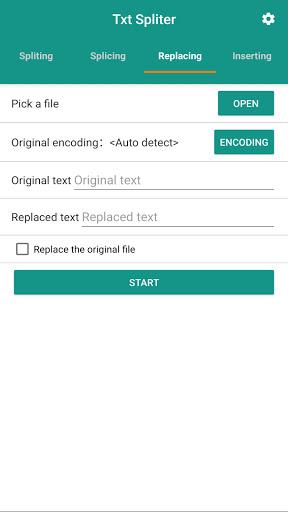
  • Rapid Text Replacement: Quickly and efficiently replace specific characters or words throughout your TXT files.
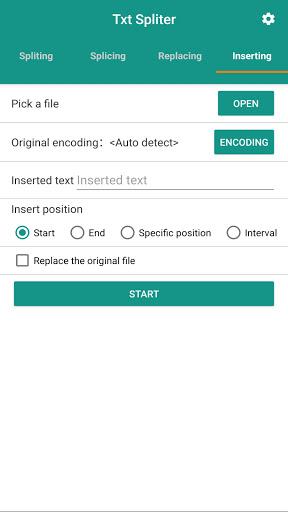
  • Flexible Text Insertion: Insert custom text at the beginning, end, specific positions, or at regular intervals within your files.
  • Streamlined File Processing: Significantly improve the speed and efficiency of your TXT file management workflow.
  • Intuitive User Interface: Enjoy a user-friendly design, making the app accessible to users of all technical skill levels.

Conclusion:

Txt Splitter is the ideal solution for anyone working with TXT files. Its comprehensive features – splitting, splicing, replacing, and inserting text – save valuable time and improve overall efficiency. With its intuitive interface, Txt Splitter is a must-have tool for efficient TXT file management. Click here to download the app and experience the difference today.
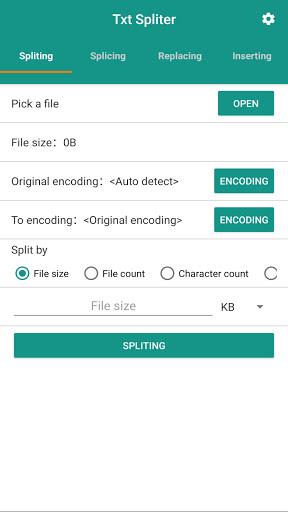
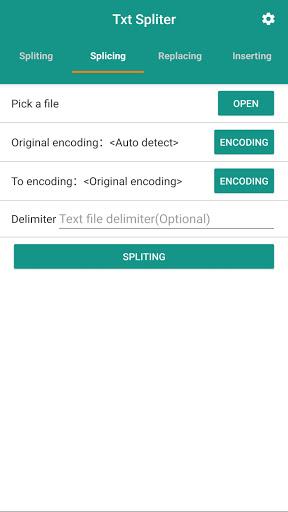
Screenshot
Txt Spliter Screenshot 0
Txt Spliter Screenshot 1
Txt Spliter Screenshot 2
Txt Spliter Screenshot 3
Latest Articles More
  • "Bird Game: Now on iOS & Android"

    The Bird Game delivers authentic flight simulation crafted by pilots with fellow aviators in mindDitching complex aviation systems for accessible fun, it captures the pure joy of flightMaster energy management across seven procedural biomes - convert

    Dec 23,2025
  • Dead Island 2 Patch 6 Introduces New Game Plus, Revenant Zombies, and Horde Mode

    Dead Island 2’s Patch 6 update brings thrilling new modes, including the intense Neighbourhood Watch horde mode, alongside exclusive content for the Dead Island 2 Ultimate Edition.Dead Island 2 Patch

    Dec 22,2025
  • New OSRS Boss Yama Arrives in Great Kourend

    Face Yama, the formidable Master of Pacts, as the new boss encounter.Defeating him rewards unique items like Demon Tallow and Grimoire Pages.The Chasm of Fire now includes dedicated mining and smithing locations.Old School RuneScape's newest update p

    Dec 21,2025
  • Neil Druckmann Teases Naughty Dog’s New Game Theme

    The Last of Us creator Neil Druckmann has revealed new insights about Naughty Dog's upcoming title Intergalactic: The Heretic Prophet.During a candid interview with Alex Garland, writer of 28 Days Later, Druckmann discussed the four-year development

    Dec 21,2025
  • Dead Cells' Final Update Launches on iOS, Android

    Dead Cells' final two updates, Clean Cut and The End is Near, have now been released.Both updates deliver the last content additions to Dead Cells, concluding years of continuous updates.New weapons, enemies, and more provide a spectacular send-off.O

    Dec 20,2025
  • Jurassic Park Tables Launch in Zen Pinball World

    Zen Studios is enhancing the Zen Pinball World collection with two new DLC packs that recreate memorable cinematic moments on the pinball table. The latest additions are Universal Classics Pinball and Jurassic Park World Pinball.Excited for the New Z

    Dec 20,2025