Home Apps Tools Txt Spliter
Txt Spliter

Txt Spliter Rate : 4.5

Download
Application Description

Introducing Txt Splitter: Your Ultimate Solution for Efficient TXT File Management

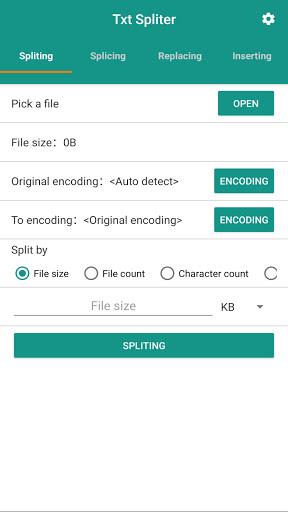
Txt Splitter is a powerful tool designed to simplify and streamline your text file processing needs. This app offers a range of functions for precise and efficient manipulation of TXT files. Choose from four methods to split your files: by size, number of files, character count, or custom separators.

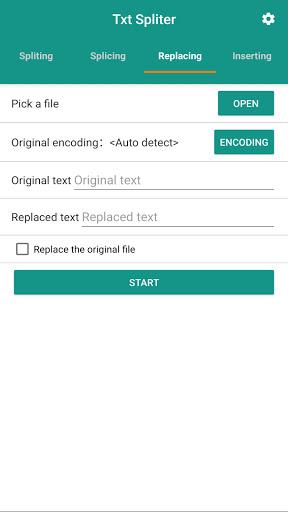
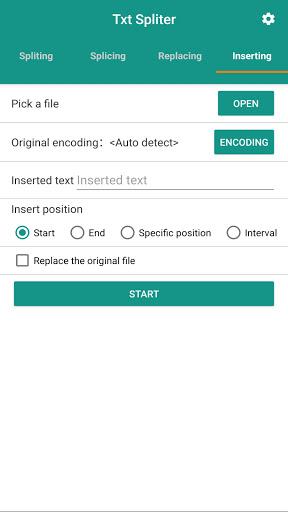
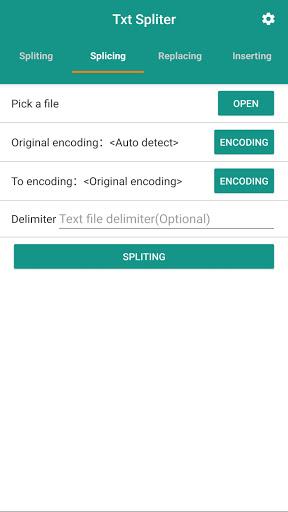
Need to combine multiple files? Txt Splitter's text splicing function effortlessly merges them, allowing you to add separators for enhanced readability. Tired of manual character replacement? Our text replacing function quickly and accurately handles this tedious task. Furthermore, the text inserting function allows you to insert text at the beginning, end, specific locations, or at regular intervals within your files.

Features of Txt Spliter:

  • Precise Text Splitting: Split TXT files using four flexible methods: file size, number of files, character count, or defined separators.
  • Effortless Text Splicing: Merge multiple TXT files seamlessly, adding separators as needed for organized output.
  • Rapid Text Replacement: Quickly and efficiently replace specific characters or words throughout your TXT files.
  • Flexible Text Insertion: Insert custom text at the beginning, end, specific positions, or at regular intervals within your files.
  • Streamlined File Processing: Significantly improve the speed and efficiency of your TXT file management workflow.
  • Intuitive User Interface: Enjoy a user-friendly design, making the app accessible to users of all technical skill levels.

Conclusion:

Txt Splitter is the ideal solution for anyone working with TXT files. Its comprehensive features – splitting, splicing, replacing, and inserting text – save valuable time and improve overall efficiency. With its intuitive interface, Txt Splitter is a must-have tool for efficient TXT file management. Click here to download the app and experience the difference today.
Screenshot
Txt Spliter Screenshot 0
Txt Spliter Screenshot 1
Txt Spliter Screenshot 2
Txt Spliter Screenshot 3
Latest Articles More
  • Wingspan Asia Release Date Revealed

    Monster Couch has officially announced the release date for the highly anticipated Wingspan: Asia Expansion. The digital expansion will launch simultaneously on all platforms on June 16, 2025. As the third addition following the European and Oceania

    Dec 26,2025
  • Silent Hill f: Suzie Yeung Voices Hinako

    Tonight's Gamescom Opening Night Live featured a fresh look at Silent Hill f, including a new trailer and our first introduction to English voice actor Suzie Yeung as the protagonist, Hinako.The trailer begins with Hinako awakening disoriented in a p

    Dec 26,2025
  • Fix Missing Flush Factory Portraits in Fortnite

    Fortnite OG features several Chapter 1 Season 1-inspired quests, including this nostalgic fetch mission that sends players to Flush Factory to recover two missing portraits for quick XP rewards. Gear up and dive into Fortnite OG's Battle Bus to claim

    Dec 26,2025
  • Switch 2 Accessory Costs Rise, Drawing Fan Criticism

    Nintendo has officially announced the pre-order date and pricing details for its upcoming Switch 2 console and accessories. While the console’s price remains unchanged, accessory pricing has seen broad increases—changes that may impact early adopter

    Dec 26,2025
  • Methods 5 Ends Series with Stunning Visual Novel Finale

    Erabit Studios' acclaimed Methods mystery series concludes today with the release of its fifth and final installment now available on iOS and Google Play. The grand finale introduces stage six's new challenges and includes the additional DLC chapter

    Dec 25,2025
  • Bruce Willis' Die Hard Tips Aid Samuel L. Jackson as Nick Fury

    Legend to legend, Bruce Willis shared invaluable advice while filming the 1994 blockbuster "Die Hard With a Vengeance." During a candid moment, Willis told Samuel L. Jackson:"He said, 'Find a signature role—one you can always return to, even if other

    Dec 25,2025